
Easily find your Service ID in three simple ways:
At times, clients may need to provide their Service ID (Package ID) — for example, when requesting support or managing their service.
Here are three easy ways to find your Service ID:
1. From the Home Page:
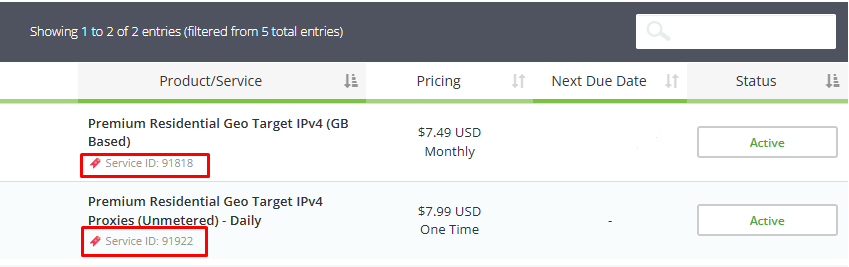
On your Home page, under the Your Active Products/Services section, you will find all your active plans. Below each service name, the Service ID is displayed.

2. From the My Services Page:
Go to Services → My Services. This page lists all your active plans. Each service card or row includes its Service ID.

3. From the Service URL:
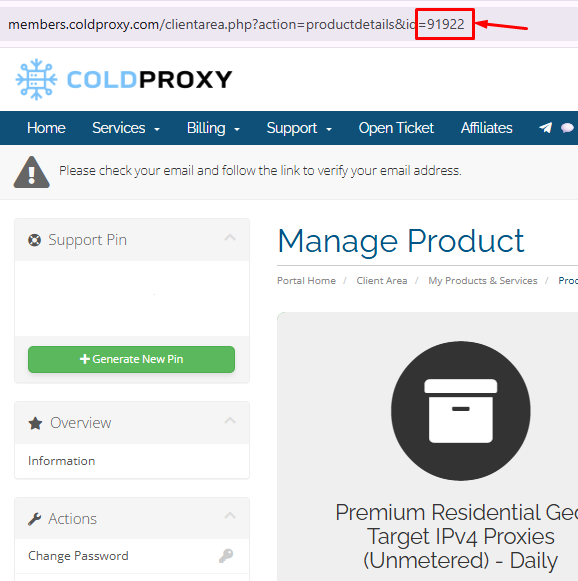
Go to the Services section and open the specific service you want to check. In your browser’s address bar, you’ll see a link that includes id= followed by a number. That number is your Service ID (also referred to as Package ID).
- Your Service ID (Package ID) helps you manage your services efficiently and allows the support team to identify each service accurately, especially if you have multiple plans.
