
How to Add Funds to Your Account
There are two ways to add funds to your ColdProxy account:
1. From the Client Area Home Page
You can add funds directly from the home page inside your client area. Simply log in, locate the Add Funds option, and proceed with the steps shown.
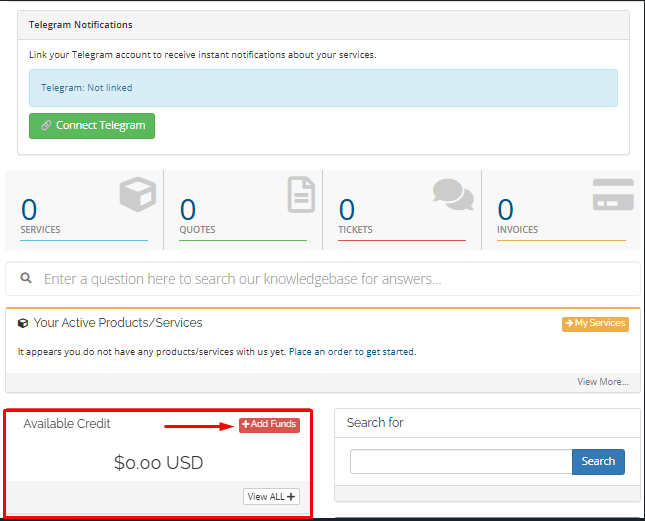
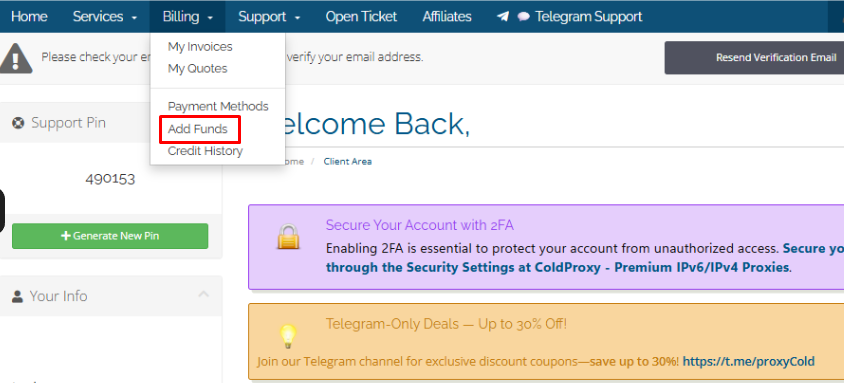
2. From the Billing Section in the Dashboard:
You can also navigate to the Add Funds page from the billing section in your client area.
Payment Methods
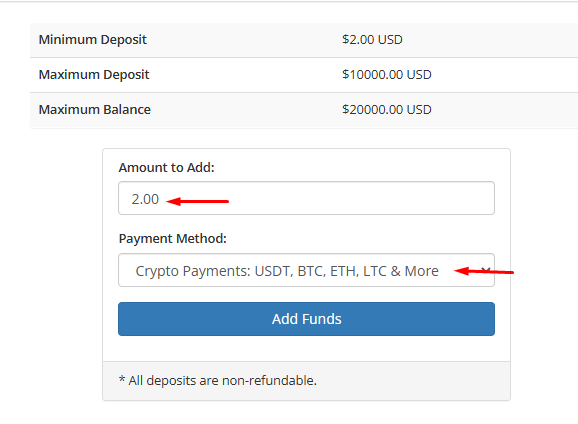
You can add funds using a credit card through Stripe or supported cryptocurrencies, such as USDT, BTC, ETH, LTC, and more.
Before Adding Funds
Make sure to enter the exact amount you want to add and complete the payment using one of the available payment methods.
If you choose to pay with cryptocurrency, make sure to use a supported cryptocurrency, such as USDT, BTC, ETH, LTC, or another available option.
Important Notice
Please note that funds added to your account balance cannot be withdrawn. Any unused balance will remain in your account and can be used for future purchases.
