
Reminder Feature to Manage Your Plans Easily
- The Reminder feature helps you stay on top of your plan expirations and notifies you in the way that suits you, either via Telegram or Email.
- This feature is now available for all daily, weekly, and even monthly plans, allowing you to easily know when your plan will end and receive alerts before it expires.
How to Use the Reminder Feature:
- After purchasing a plan
When you purchase a plan, The Reminders box will initially appear with the following data:

- Fill in the reminder details
For each Reminder, you need to specify:
Time before expiry, Unit (minutes, hours, days), and Channel (Email or Telegram)
Then click Save to confirm.
Note: If the reminder is still in Pending status, you can edit its details. Once it changes to Sent, you can no longer modify it.
- Manage more than one reminder
You can set up to 2 reminders per plan.
To add the second one, click Add Reminder and enter the details (time, unit, channel).
- Connecting Telegram (for Telegram option)
If you choose Telegram as the delivery channel, click Connect Telegram.

When you click it, you will be redirected directly to Telegram, where you can select Open Telegram to complete the linking process.
You will receive a message confirming that the plan has been successfully linked (Start).

Receiving Reminders:
- Telegram: You’ll receive a message containing your plan details and the remaining time before it expires.

- Email: If you choose Email, you’ll receive a message with the same details.

Auto Reminders
It’s also available as an Auto Reminder that triggers automatically based on your plan type (hourly trial, daily, weekly, or monthly).
-
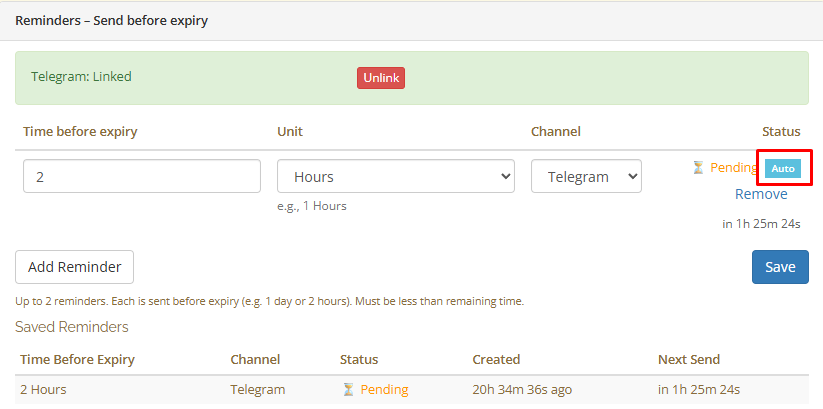
Activation: Auto reminders appear automatically in the Reminders box and in the Telegram bot if your Telegram account is linked.
-
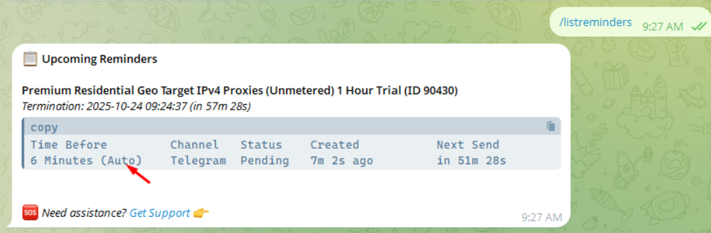
Telegram only: Auto reminders are sent exclusively via Telegram and will not work with Email.
-
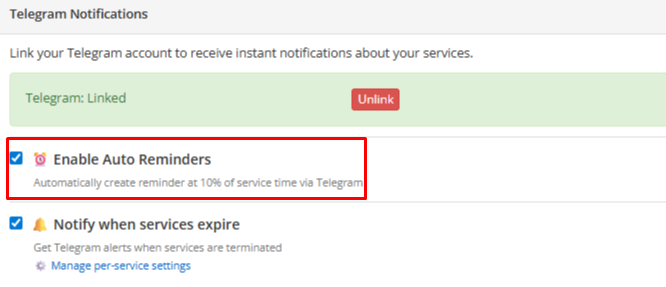
Flexibility: You can disable or cancel Auto reminders at any time.
- Easily Renew Your Plan:
Each reminder message includes a direct link to RENEW your plan if needed.
What’s in it for you as a customer?
- You’ll get reminders showing the remaining time before your plan expires, along with full plan details.
- Each reminder includes a direct link to renew your plan instantly if needed.
- You choose whether to get notifications on Telegram or Email — whatever works best for you.
This feature makes it easier to stay organized, manage your plans, and never miss any important detail.
