
How To Open a Ticket On The Website
If you need assistance with your service, you can contact our support team by opening a ticket. Follow these steps:
1. Go to the Homepage
Log in to your account and click on Open a Ticket on the homepage.

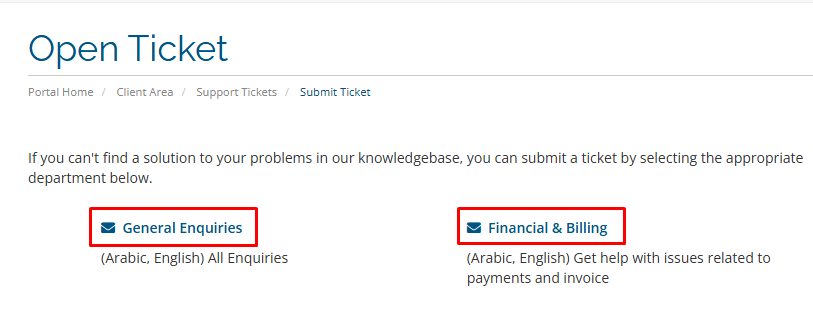
2. Select the Ticket Type
You will see two options: General Queries and Financial Queries.
-
General Queries: For all general enquiries.
-
Financial Queries: For issues related to payments and invoices.
3. Fill in the Ticket Information
After selecting the correct category, you will be directed to the ticket form. Fill in the required information as follows:
A) Subject: Enter a brief title for your request.
B) Department / Related Service / Priority:
Choose the relevant Department, the Related Service you are having an issue with, and set the Priority of your ticket.

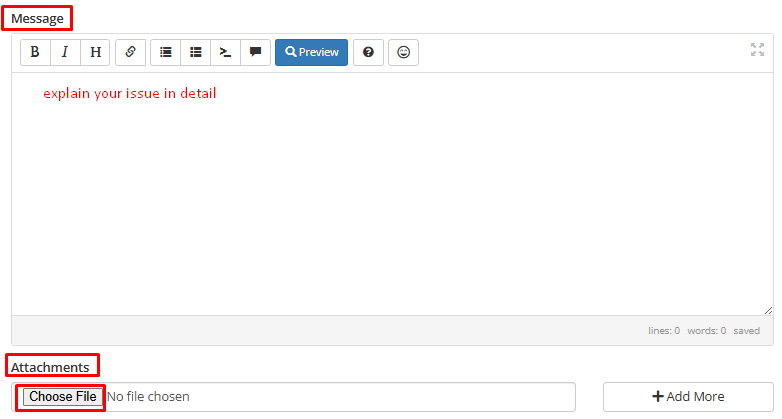
C) Message / Attachments:
Use the Message box to explain your issue in detail.
If needed, attach any screenshots or files using the Attachments button.
4. Submit the Ticket
Once all required information is filled in, click Submit. Your ticket will be sent to our support team, and they will respond to you as soon as possible.