
Having Issues with Your Proxies? Try a Reboot!
If your proxies aren't working—whether they've stopped, slowed down, or are acting up—a reboot can often fix the problem quickly. Just like restarting a computer, rebooting your proxy server refreshes the system and resolves common performance issues.
• When Is Proxy Rebooting Useful?
Rebooting is especially helpful when:
- Your proxies have stopped working.
- They are running slower than usual.
- An application on the proxy is frozen or unresponsive.
This reboot option is available for all old system plans and is one of the easiest ways to get things running smoothly again.
• What to Do Before Rebooting
- Check Your IP Authentication
Make sure the IP address you're using is properly authenticated in your account settings. This is often the root of many connectivity issues.
• How to Reboot Your Proxy Server
- Go to your service dashboard.
- Click on the service you'd like to reboot.
- Click Reboot Proxies.
- Click Proceed with Reboot.
Note: Rebooting the proxies will result in a temporary downtime of less than 5 minutes.
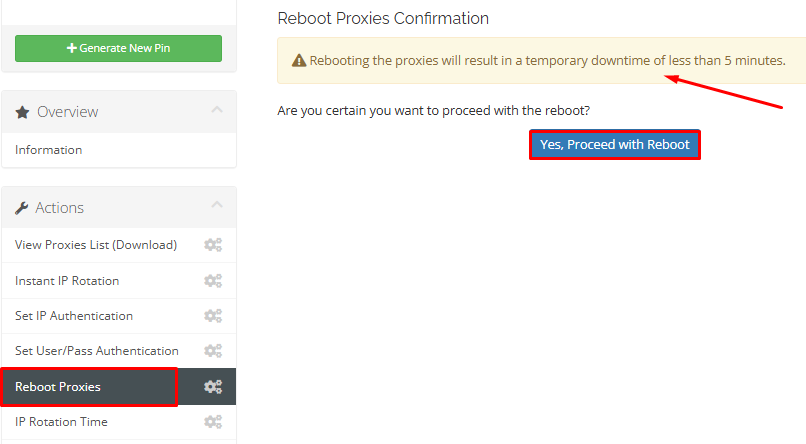
That’s it! Your proxy server will reboot and should return to normal functionality.
Simple, fast, and effective—try rebooting the next time your proxies don’t work as expected.
Step Before Rebooting:
1.Verify the IP address you use is whitelisted in your account settings.
2.Ensure there are no active sessions/processes that could be disrupted by the reboot.
